Free template
Drink menu template – from coffee to cocktails
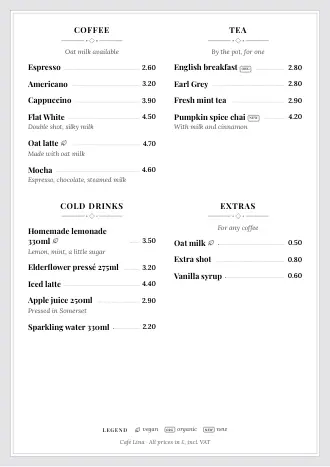
Type in drinks, sizes and prices, pick a style, save as a PDF or print. For cafés, bars and wine lists, with no sign-up and no watermark.
- Free, no sign-up
- 30 styles on one A4 page
- PDF or print directly
Or start with a ready-made example:
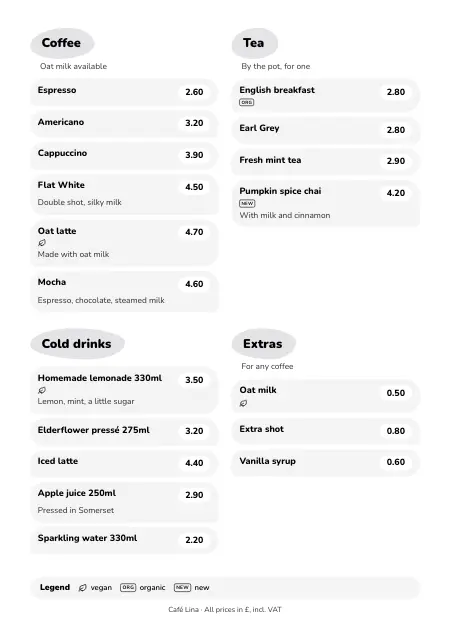
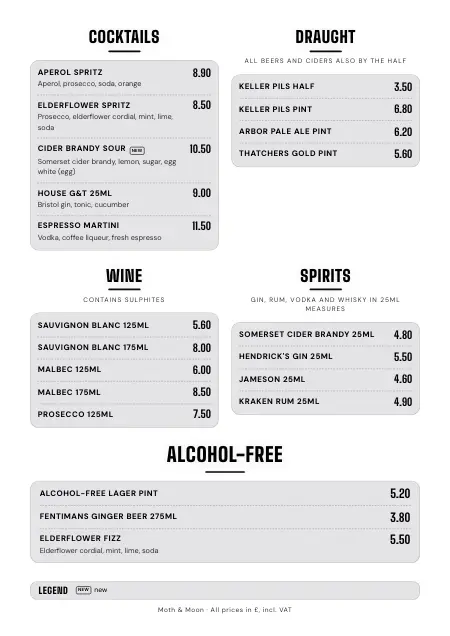
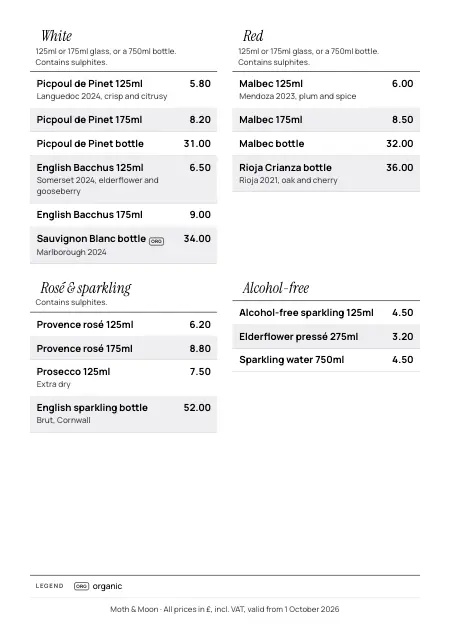
The template
Create your drinks menu
Pick an example or start blank. What you type stays in your browser until you save the PDF or print.
The PDF works for a copy shop too. “Print” opens the menu in a new tab.
Tips: sizes, glass and bottle, allergens, currency
- Write allergens in the description, e.g. “Contains sulphites” for wine or “Contains milk” for coffee. Create a free allergen matrix
- Two sizes? Add two lines and put the size in the name: “Pils half” and “Pils pint”. The “Price” field takes one number only.
- Glass and bottle are two lines too: “Malbec 125ml”, “Malbec 175ml” and “Malbec bottle”.
- In England and Wales the measures belong on the menu: a 125ml wine glass, 25ml or 35ml spirits, beer and cider by the half.
- If one size applies to the whole category, write it in the text underneath, e.g. “All wines by the 125ml glass”.
- Prices go on the menu without a currency. Put the currency and “Prices valid from …” in the footer.
Your page is made of rows with 1 or 2 columns. The categories fill the places in order, like text. Use “Earlier” and “Later” to shift a category by one place. Tap a category to edit it.
Row 1
Your menu as a QR menu too
Add your drinks to momoscreen. Your QR menu is then live, and you change prices once on your phone. Free, no subscription.
You check everything again before it's saved.
Saved automatically in this browser.
Anatomy of a drinks menu
What goes on your drinks menu
A drinks menu read from top to bottom: six places where guests look and where the law reads along. “Required” marks what the law asks for in England and Wales.
Start with what gets ordered first: in a bar that's cocktails and draught, in a café it's coffee. Wine and spirits follow, and alcohol-free drinks get a category of their own instead of hiding under “Other”. Short names everyone understands beat clever ones: guests only skim a drinks menu. More on order and readability in our menu design tips.
“Keller Pils pint”, “Hendrick's Gin 25ml”: in England and Wales, beer and cider must be available by the half pint, gin, rum, vodka and whisky in 25ml or 35ml, and your menu or price list has to show these measures. Anywhere else, guests still only compare prices when they know the size. In the template the measure goes in the name, because the price field takes one number.
A Malbec by the 125ml glass, the 175ml glass and the bottle is three lines with three prices. If you sell still wine by the glass, a 125ml glass has to be on offer and on the menu. When one size covers the whole category, write it once in the text under the category, e.g. “125ml or 175ml glass”. Grape, region and vintage go in the description.
Drivers, non-drinkers and anyone taking it easy look for this category first. Give alcohol-free drinks a heading of their own and sizes like everything else: “Alcohol-free lager pint”, “Ginger beer 275ml”. A good alcohol-free list sells drinks that would otherwise be a glass of tap water.
Drinks have allergens too: sulphites in wine, milk in coffee, gluten in beer, egg white in a sour. The same rules apply as for food. There's no separate allergen field: write them in the description or in the text under the category, e.g. “Contains sulphites”.
At the bottom are your name and a line you write yourself: “All prices in £, incl. VAT, valid from 1 October 2026”. The prices on the menu must be the total a guest pays, including any compulsory charge. With a free account you also print a QR code here: guests scan it and see the whole menu on their phone, in other languages too. What else applies to prices on menus and outside the door is in our guide to menu price display rules.
Sources and legal status
- Licensing Act 2003 (Mandatory Licensing Conditions) Order 2010, Schedule
- Weights and Measures (Intoxicating Liquor) Order 1988
- Digital Markets, Competition and Consumers Act 2024, section 230
- Food Information Regulations 2014 (England), regulation 5
Legal status: October 2026, England and Wales. Not legal advice. Scotland, Northern Ireland and other countries have their own rules; if in doubt, ask your local licensing authority or Trading Standards.
Sizes
Two sizes? Two lines.
There's no size field, and you don't need one: every size gets its own line with its own price. That way guests see at a glance what the half and the pint cost.
Draught and bottle work the same way: “Pale Ale pint” on draught and “Pale Ale bottle 330ml” are two lines. Coffee too: “Latte” and “Large latte”.
Changing prices
The brewery puts its prices up. Now what?
On paper that means crossing out, writing over or reprinting the lot. With a free momoscreen account you change the prices once on your phone. Your QR menu is up to date automatically, and you remake the printed menu with one tap.
Paper never changes by itself. You reprint the menu from the same data as your QR menu, without typing anything out again. More on the printable menu with QR code. See how a bar QR menu carries a whole evening, from happy hour to the TV above the bar, on our page for bars.
Seasons and happy hour
Summer drinks without a loose insert
In summer a sheet of spritzes gets tucked into the menu, in winter one with mulled wine. In the QR menu it becomes a special menu: guests tap its button at the top and see just those drinks. When the season's over, you take it off the QR menu and keep it for next year.
You set and remove promo prices yourself, a few taps per drink. They don't switch on and off by themselves: put the times in the note for guests. And leave out “all you can drink” deals: in England and Wales, unlimited drinks for a fixed price can count as an irresponsible promotion.
Food and drinks
One menu or two?
Lots of places have two: the food menu on the table, the drinks menu next to it or at the bar. The template makes one A4 page per menu; for food there's the free menu maker, which works the same way. With a free account both come from one list: a menu of up to 12 pages with a cover, in the same style as your QR menu.
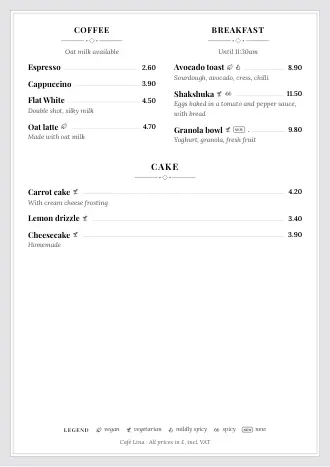
With an account: both in one menu, up to 12 pages
Questions
Questions about the drink menu template
Your question isn't here? Email us at info@momoscreen.com.
Is the drink menu template really free?
Yes, and you don't need an account: add your drinks, pick a style, save as a PDF or print. No watermark and no mention of us. You only need an account if you want to add the menu to momoscreen. That's free too.
How do I add a half and a pint?
As two lines: “Keller Pils half” at 3.50 and “Keller Pils pint” at 6.80. The price field only ever takes one number. If you type two prices into it, the template shows a hint.
Do the measures have to be on the menu?
In England and Wales, yes: beer and cider by the half pint, gin, rum, vodka and whisky in 25ml or 35ml, and still wine in a 125ml glass must be available, and your menu, price list or other printed material has to show them. The easiest way is to put the measure in the name. Outside England and Wales, check your local rules.
Do prices have to include VAT?
Yes. The price on the menu has to be the total a guest pays, including VAT and any compulsory charge. Write “All prices in £, incl. VAT” in the footer, and the prices above it are what guests pay.
Do I have to list allergens for drinks?
Yes, the same allergen rules apply to drinks as to food. Typical ones are sulphites in wine, milk in coffee, gluten in beer and egg in a sour. Write them in the description or under the category. For a chart behind the bar there's our free allergen matrix.
Can I put happy hour prices on the menu?
Yes, a normal promo price is fine. Leave out “all you can drink” deals for a fixed price: in England and Wales they can count as an irresponsible promotion. In the QR menu you set the promo price on your phone and remove it after happy hour. It doesn't switch back by itself.
How many drinks fit on one page?
That depends on the descriptions. Our bar example with 21 drinks fits comfortably on an A4 page. When it gets tight, the template makes the text a little smaller and tells you when something no longer fits. Then put two categories side by side in one row, or turn the descriptions off.
Is there a wine list template too?
Yes. Load the “Wine” example: white, red, rosé and sparkling, plus alcohol-free, in the “Wine list” style. The 125ml glass, the 175ml glass and the bottle are separate lines, region and vintage go in the description.
Can I put food and drinks on one menu?
An A4 page holds a few bar snacks next to the drinks, but rarely a whole food menu. For food there's the free menu maker. With a free account you print both as one menu of up to 12 pages with a cover.
Can I change the prices later?
Yes. Tap “Add to momoscreen (free)”, create a free account and check your drinks. After that you change prices in the app: your QR menu is up to date automatically, and you remake the printed “Drinks menu” with one tap.
Where is my drinks menu saved?
Only in your browser, on this device. We don't send anything to a server. Your food menu and your drinks menu are two separate drafts and don't overwrite each other. To be safe, download the PDF.
Type it once, up to date everywhere
With the free account your drinks menu becomes a QR menu, a menu board for the TV above the bar and a print version you remake with one tap.
No subscription · No setup fee · All features included